The Patient Recall Report will allow the clinic to run a report to see how long its been since the patients' last completed appointment, if they do not have a future appointment scheduled.
**NOTE: The Patient Status Report has been replaced by the Patient Recall Report. The Patient Recall Report generates and follows the Patient Status Flow
This report will EXCLUDE any patients that are already on the schedule for a future appointment.
To run the Patient Recall Report go to:
- Reports
- Patient Recall Report
- Select correct filter
Filters include:
- Clinic (if there is more then one running out of your database)
- Provider (to see patients for a specific provider)
- All (Ignore when last completed appointment was) This will provide a list of ALL patients seen in the office and display how long its been since they were in the office.
Or you can break your report down by selecting:
"Last completed appointment was"
- 0-30 days ago
- 31-60 days ago
- 61-90 days ago
- 91-120 days ago
- 121-180 days ago
- 181-365 days ago
- More then 365 days ago
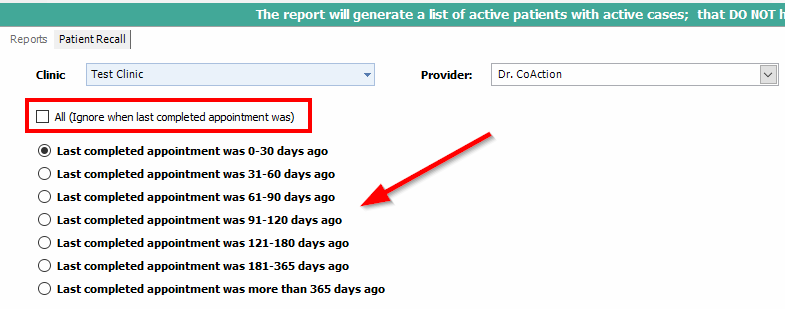
- Select Next to Run
Once generated, you will see the patients name, case info, H/W/C numbers, address and number of days since last completed appointment. 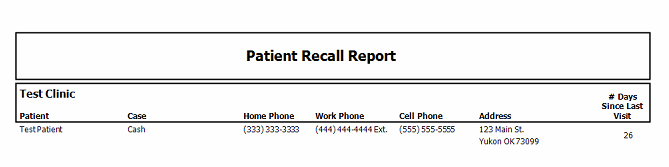
- Support Information -
If you have any questions or need assistance with this process please contact Support by:
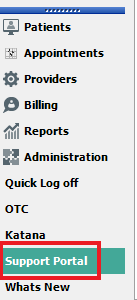
Live chat: Click the 'Support Portal' button in your main toolbar (on left-hand side), click the green 'Support' box in bottom right of screen.***This has the fastest response time***
Phone: 909-378-9514
Email: Support@coactionsoft.com
Business Hours: Monday-Friday 8am-6pm CST
Comments
0 comments
Article is closed for comments.